FPV Bench Testing Sequence: From USB to First Hover
An evergreen FPVLovers guide focused on testing a new build in the right order.
The Ultimate FPV Bench Testing Blueprint: A Step-by-Step Sequence for a Flawless Maiden Flight
The thrill of a new FPV drone build is undeniable, but nothing crushes that excitement faster than a puff of smoke or an unexpected crash on its maiden flight. Before you take to the skies, a meticulous bench testing sequence is not just recommended – it's absolutely critical. This comprehensive guide will walk you through every essential step, transforming your newly assembled quad from a collection of parts into a perfectly tuned, flight-ready machine. Prepare for a flawless maiden flight, built on a foundation of safety and methodical verification.
Setting the Stage: Preparation & Essential Tools
Before diving into the intricate details of testing, a solid foundation is paramount. Your workspace and toolkit are just as important as the drone itself.
Establishing Your FPV Workbench
A clean, organized, and static-free workspace is the first step towards successful bench testing. Ensure good lighting, ample space, and a non-conductive surface to prevent accidental shorts or damage to sensitive electronics. A silicone mat or wooden surface works wonders. Good ventilation is also a plus, especially when soldering.
The Essential Toolkit for Bench Testing
Gather your indispensable tools:
- Multimeter: Absolutely critical for continuity checks, voltage verification, and troubleshooting. A basic digital multimeter like a Fluke 101 or a UNI-T UT139C is sufficient.
- Smoke Stopper: Your build's guardian angel. This inexpensive device can save you hundreds of dollars.
- Soldering Iron: A quality iron with temperature control (e.g., TS101, Hakko FX-888D) is essential for making reliable connections and fixing any issues discovered.
- Spare Wires, Heat Shrink, Zip Ties: Always have these on hand for adjustments and securing components.
- Computer with Betaflight Configurator: The primary interface for your flight controller.
- LiPo Battery & Charger: For powering your drone during testing.
- FPV Goggles/Monitor: To test your video system.
- Radio Transmitter: To bind and verify receiver functionality.
These tools are your allies in identifying and resolving issues before they become catastrophic.
Understanding the FPV Bench Testing Philosophy
Bench testing is a methodical process, moving from basic power checks to full system verification. The core principle is "test small, test safe." Never rush, and always assume there might be an issue until proven otherwise. Safety first, always. Each step builds upon the last, ensuring that power, communication, and propulsion systems are all verified in a controlled environment.
The Critical First Steps: Power-Off & Smoke Stopper Checks
This initial phase is designed to catch fatal errors before they can damage your expensive electronics. Patience here will save you significant headaches and money.
Thorough Visual Inspection & Wiring Verification
Before any power is applied, visually inspect every solder joint, wire connection, and component placement. Use a magnifying glass if necessary. Check for:
- Stray Solder Balls: These are notorious for causing shorts.
- Pinched Wires: Ensure no wires are being crushed by frame components or standoffs.
- Correct Polarity: Double-check that positive (+) and negative (-) wires are connected to their respective pads on the flight controller, ESCs, VTX, and camera.
- Tight Screws: Confirm all motor screws, frame screws, and standoff screws are appropriately tightened.
- Correct Component Orientation: Ensure your flight controller is facing the correct direction, as indicated by an arrow on the board.
This is your last chance to catch obvious mistakes with your eyes.
The Indispensable Continuity Test with a Multimeter
Using your multimeter in continuity mode (which typically beeps when a circuit is closed), check for shorts. This step is paramount to prevent catastrophic damage.
- Battery Pads: Touch the multimeter probes to the main battery positive and negative pads on your flight controller. It should not beep. If it does, you have a direct short, and you absolutely must find and fix it before proceeding. This is the most common cause of smoke.
- ESC Power Rails: Briefly check continuity between the main power pads on each ESC (if separate from the FC).
- Other Power Points: You can also check between 5V and GND, or 3.3V and GND pads on your FC, but be aware that some components might show a momentary beep due to capacitors charging, then go silent. The main battery pads are the most critical check.
Practical Tip: If you find a short, carefully re-inspect your solder joints, looking for bridges or whiskers of solder. Sometimes, a tiny strand of wire can cause a short.
Your First Power-Up: The Smoke Stopper Protocol
The smoke stopper is your build's best friend. Connect it between your LiPo battery and the drone. This device limits current, preventing components from burning out if a short exists. Power up with the smoke stopper in place and observe.
- Normal: The smoke stopper's LED might flicker briefly and then go out, or glow very dimly. This indicates no major short.
- Short Circuit: If it lights up brightly or buzzes, you have a short – immediately disconnect and troubleshoot. Do not proceed until the smoke stopper indicates a clear circuit.
Real-world Note: High-quality smoke stoppers like those from RDQ or Pyrodrone often feature resettable fuses and clearer indicators.
Verifying Basic Power & Flight Controller Boot-Up
If the smoke stopper indicates no short, proceed to power up the drone (you can now connect the LiPo directly, but some pilots prefer to keep the smoke stopper in for a few more initial tests). Check for:
- LEDs: Look for LEDs on the flight controller, ESCs, and receiver. Most modern FCs (e.g., Matek H743, iFlight BLITZ F7) will have a solid power LED and a blinking status LED.
- Sounds: Listen for the ESCs' boot-up tones, indicating they are receiving power and communicating with the FC. These tones often indicate the number of cells in your LiPo (e.g., three beeps for 3S, four beeps for 4S).
This confirms basic power distribution and that your flight controller is booting correctly.
Flight Controller & Radio System Setup (Betaflight & RX)
With basic power confirmed, it's time to bring your quad to life through software.
Connecting to Betaflight: Drivers and Configuration
- Connect: Connect your flight controller to your computer via USB.
- Drivers: Ensure you have the correct DFU drivers installed. If you encounter issues, use the ImpulseRC Driver Fixer tool.
- Configurator: Open Betaflight Configurator. If your FC is recognized, click "Connect."
- Backup: Immediately go to the CLI tab and type
diff allthensave. Copy and save this output to a text file. This is your default configuration backup. - Initial Setup: Navigate through the tabs:
- Ports: Configure your UARTs for your receiver (e.g., Serial RX on UART2), VTX (e.g., SmartAudio/TrampHV on UART1), and GPS if applicable.
- Configuration: Set your ESC protocol (e.g., DShot600), receiver protocol (e.g., SBUS, CRSF), accelerometer trim (keep flat), and other basic settings.
- PID Tuning: For now, keep defaults. You'll tune later.
Practical Tip: Always use the latest stable version of Betaflight Configurator and firmware for the best compatibility and features.
Receiver Binding & Channel Mapping
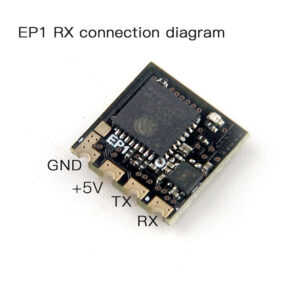
- Bind: Bind your radio transmitter (e.g., Radiomaster TX16S, FrSky Taranis) to your receiver (e.g., ExpressLRS EP1, Crossfire Nano RX). Follow your specific receiver's binding procedure.
- Receiver Tab: In Betaflight's Receiver tab, verify that all stick inputs (roll, pitch, yaw, throttle) and auxiliary switches are correctly mapped and responding as expected.
- Move your sticks and switches. The corresponding bars in Betaflight should move smoothly and within the correct ranges (typically 1000-2000, with 1500 being center).
- Adjust
rxrangein CLI if your endpoints aren't quite 1000/2000.
- Channel Order: Ensure your channel order (AETR1234 or TAER1234) matches your radio.
Configuring Failsafe and Arming Switches
- Failsafe: This is a critical safety feature. Configure your failsafe in Betaflight (Failsafe tab) and on your radio. The recommended setting is
DROP(motors immediately stop). Test it by momentarily turning off your radio while connected to Betaflight (props off!). Your drone should disarm. - Arming Switch: Configure an arming switch on your radio and assign it in Betaflight's Modes tab. Test it thoroughly (again, props off!).
- Ensure the arming switch correctly arms and disarms the quad.
- Also, configure other essential modes like Angle, Horizon, and Beeper.
Safety First: Never arm without propellers and always be ready to disarm. Test your arming switch repeatedly until you are confident in its operation.
Propulsion & Video System Verification (Motors, ESCs, VTX, Camera)
Now we move to the systems that enable flight and FPV vision.
Motor Direction & ESC Protocol Testing (Props Off!)
CRITICAL: PROPELLERS MUST BE REMOVED FOR THIS STEP.
- Motors Tab: Go to the Motors tab in Betaflight. Read the warning and check the "I understand the risks" box.
- Individual Motor Test: Test each motor individually at a very low throttle (e.g., 1050-1100).
- Verify that all motors spin in the correct direction according to your quad's configuration (usually 'props in' or 'props out' – Betaflight shows a diagram).
- If a motor spins the wrong way, you'll need to reverse its direction. For BLHeli_32 or AM32 ESCs, use BLHeliSuite32 or ESC Configurator to connect to your ESCs and reverse the motor direction. For 4-in-1 ESCs, you'll usually reverse via the Configurator.
- ESC Protocol: Confirm your ESC protocol (e.g., DShot600, DShot300) is selected in the Configuration tab and that all ESCs are responding correctly.
Practical Tip: If a motor doesn't spin, check its solder joints to the ESC, and the signal wire from the FC to the ESC. It could also be a faulty motor or ESC.
Camera Feed & OSD Configuration
- Power Up: Power up your FPV goggles or monitor. Ensure you receive a clear video feed from your camera.
- OSD Tab: In Betaflight's OSD tab, configure your On-Screen Display to show essential information like battery voltage, flight mode, RSSI, craft name, and current.
- Arrange elements logically so they are legible and not obstructed.
- Verify the OSD elements appear correctly in your goggles.
- Check that battery voltage readings are accurate compared to your multimeter.
Real-world Note: Cameras like the RunCam Phoenix 2 or Caddx Ratel 2 offer excellent image quality and low latency. Ensure your camera's settings (brightness, contrast) are adjusted to your preference.
VTX Power Output and Channel Verification
- VTX Tab: Go to the Video Transmitter tab in Betaflight.
- Configure: Confirm your Video Transmitter (VTX) is set to the correct power output (e.g., 25mW for initial testing, 200mW+ for flying outdoors) and channel for your region and flying environment. Always adhere to local regulations.
- Verify: Use your goggles to scan for your VTX signal and verify the clarity and strength of the video feed.
- If using SmartAudio or TrampHV, ensure you can change VTX settings via your OSD or radio stick commands.
- Avoid Overheating: Avoid high power settings indoors or for extended periods without airflow, as VTXs can overheat quickly.
Product Examples: Popular VTXs include the TBS Unify Pro32 Nano, Rush Tank Mini, and Foxeer Reaper F4.
Final Safety & Pre-Flight Readiness
You're almost there! These final steps ensure everything is buttoned up and ready for flight.
Gyro Calibration & Accelerometer Trim
- Level Surface: Place your drone on a perfectly level surface.
- Calibrate: Go to the Setup tab in Betaflight and click "Calibrate Accelerometer." This ensures your flight controller has an accurate reference for level flight. If using angle or horizon modes, a proper calibration is crucial for stability.
Practical Tip: An uncalibrated accelerometer can cause your drone to drift significantly in self-leveling modes.
Final Visual Inspection & Hardware Checks
Perform one last comprehensive visual check:
- Screws & Standoffs: Double-check all screws, standoffs, and frame components for tightness.
- Wire Routing: Ensure all wires are neatly routed, secured with zip ties, and not in danger of being cut by spinning propellers or chafing against carbon fiber.
- Antennas: Confirm RX and VTX antennas are securely attached and oriented correctly for optimal signal.
- Battery Strap: Ensure your battery strap is properly installed and secure.
Pre-Maiden Field Checklist (Props On at the Field!)
Before you head to your flying spot, create a mental or physical checklist.
- Propellers: Remember: propellers are only installed at the flying field, just before your maiden flight. Never install propellers during bench testing.
- Battery Charge: Verify all your LiPo batteries are fully charged.
- Radio Settings: Double-check your radio's battery level and model selection.
- Tools: Bring essential field tools like a prop wrench, spare props, and a small screwdriver.
- Location: Choose a safe, open flying area, away from people, obstacles, and restricted airspace.
Essential Tools for a Safe FPV Bench
Investing in the right tools is investing in the longevity and safety of your FPV journey.
The Lifesaving FPV Smoke Stopper
An absolute must-have for any FPV builder. This simple device can save you hundreds of dollars by preventing component damage from shorts during initial power-ups. Look for models with adjustable trip current for versatility, like the VIFLY ShortSaver 2 or a standard RDQ Smoke Stopper. It's a small price to pay for peace of mind.
Multimeters: Your Diagnostic Companion
A good digital multimeter is invaluable for checking continuity, voltage, and resistance. It's essential for troubleshooting shorts, verifying battery voltage, and ensuring proper power distribution throughout your drone. A basic model from UNI-T or Klein Tools will serve you well.
Reliable Soldering Station & Supplies
While not strictly for 'testing,' a quality soldering iron with temperature control, various tips, good solder (e.g., Kester 63/37), and flux are crucial for making reliable connections and fixing any issues discovered during testing. Don't skimp on this essential tool; it dramatically impacts the quality of your builds.
Bench Power Supply & LiPo Charger
A dedicated bench power supply can be useful for powering components during testing without draining your flight batteries, especially for longer troubleshooting sessions. A reliable LiPo charger (e.g., ISDT Q8, HOTA D6 Pro) is also essential for keeping your flight batteries in top condition for safe testing and flying. Always balance charge your LiPos.
Frequently Asked Questions About FPV Bench Testing
What is the most critical step in FPV bench testing?
The continuity test with a multimeter, followed immediately by the first power-up with a smoke stopper, are the most critical steps. These prevent catastrophic damage from shorts before any significant power is applied. Skipping these steps is a recipe for disaster.
Can I skip the smoke stopper if I'm confident in my wiring?
Absolutely not. Even experienced builders make mistakes. A tiny strand of solder or a misplaced wire can cause a short. The smoke stopper is an inexpensive insurance policy that can save your entire build. Never power up a new build without it.
How do I troubleshoot if my motors aren't spinning correctly?
First, ensure propellers are off. Check motor wiring for loose connections or incorrect soldering. Verify motor direction in Betaflight/ESC Configurator (use BLHeliSuite32 or ESC Configurator to reverse individual motors). Check ESC protocol settings in Betaflight's Configuration tab. If a motor still doesn't spin, it might be a faulty motor or ESC, which you can often diagnose by swapping motor positions to see if the problem follows the motor or stays with the ESC.
What if I don't get a video feed from my VTX?
Check all connections from the camera to the VTX and from the VTX to the flight controller. Ensure the VTX is powered, and its channel/band matches your goggles. Confirm your camera is receiving power (often 5V or VCC). If using SmartAudio/TrampHV, verify it's configured correctly in Betaflight's Ports tab and that you can change VTX settings via your OSD. Also, check for physical damage to the camera lens or VTX antenna connector.
When should I install the propellers?
Propellers should only be installed at the flying field, just before you intend to fly. Never install propellers during bench testing, as accidental arming can lead to serious injury. Treat propellers with the utmost respect.
Master Your Maiden Flight with Confidence
Recap of the Importance of Methodical Testing
By diligently following this FPV bench testing sequence, you've systematically eliminated potential issues, ensuring every component functions as intended. This methodical approach is the hallmark of a responsible and successful FPV pilot. You've checked power integrity, verified communication, confirmed motor functionality, and ensured your video system is crystal clear. Each step contributes to a safer, more enjoyable flying experience.
The Reward of a Flawless First Flight
The effort invested in thorough bench testing pays off with the unparalleled satisfaction of a smooth, predictable, and ultimately safe maiden flight. There's nothing quite like the feeling of watching your meticulously built drone lift off the ground for the first time, knowing you've done everything in your power to ensure its success. You've built confidence in your machine, and it's ready to perform.
Your Next Step: Take to the Skies!
With your FPV drone meticulously tested and verified, you're now ready for the moment you've been waiting for. Head to a safe, open flying area, perform your final pre-flight checks (radio on, drone on, goggles on, clear surroundings, arming switch check), and experience the pure joy of FPV flight. Happy flying!
Copyright-safe media generated locally by FPVLovers